
OEE Downtime
Smarter performance tracking for a more productive operation.
 Intro to OEE Downtime
The Sepasoft OEE Downtime Module helps manufacturers improve equipment effectiveness across lines, plants, and enterprises by reducing operating costs, increasing throughput, and driving higher profitability.
Key Capabilities:
- Real-Time OEE and Downtime Tracking
- Root-Cause Downtime Detection
- Production Scheduling
- Live and Historical Analysis
- Automated Data Collection
- Multi-Site and Enterprise Scalability
- Seamless Integration
Real-Time OEE and Downtime Tracking
Get a live view of equipment performance across every line and shift. The OEE Downtime Module continuously collects production counts, cycle times, and downtime events to show how each process is performing right now. The resulting data provides a clear foundation for configurable KPIs that highlight performance trends and production losses.
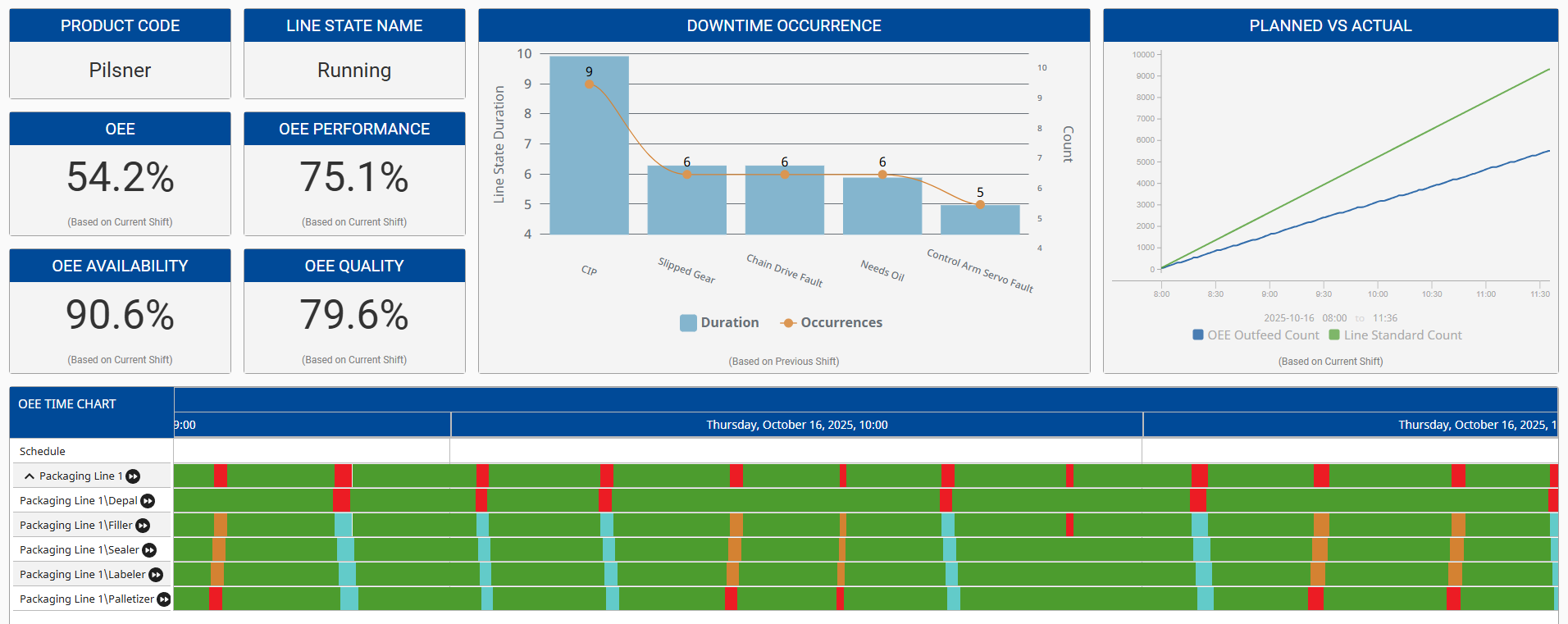
Downtime Detection Methods
A variety of OEE downtime detection algorithms accommodate different equipment layouts to identify the true cause of OEE downtime events. Primary production equipment commonly contains multiple sub-equipment items (cells), and based on the selected OEE downtime detection algorithm, the system determines the root cause of why the primary equipment is not in production.
Simple equipment state, initial reason, parallel cells, key reason, and other OEE downtime detection algorithms can be applied at the production line level or across cell groups to support a wide variety of scenarios. The key reason algorithm supports the key cell being located anywhere within the line and considers backup or starved conditions when determining the root cause of the OEE downtime event.
For equipment layouts where a single root cause is not appropriate, the OEE Downtime Module tracks cycle times to help identify bottlenecks in product flow. Blocked and starved times are tracked separately to further narrow in on actual equipment OEE downtime events.
Production Scheduling
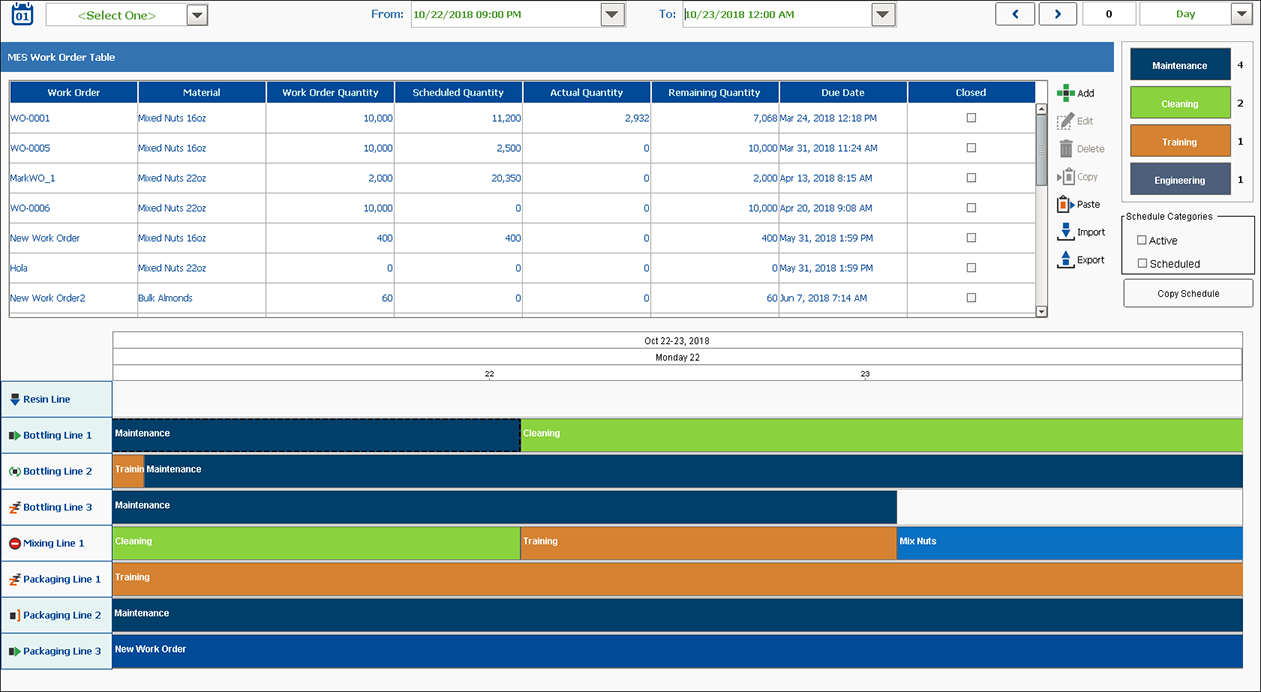
OEE Enhanced Production Scheduling allows you to visualize the production schedule alongside actual versus target output, machine status, delayed production, and other key OEE indicators in real time. Scheduled production entries can be sourced from an enterprise resource planning (ERP) system, entered manually, or created by simply dragging a work order onto the schedule.
Breaks and other routine workday events are displayed directly on the schedule, providing a complete and intuitive view of current and upcoming production activities. Schedule entries automatically adjust based on production progress, breaks, and other real-time factors that impact execution. Updated schedules are dispatched to equipment operators, warehouse staff, quality technicians, and other roles so everyone works from the same, up-to-date production plan.
Running Changeovers
The OEE Downtime Module accurately tracks production counts and other key data when multiple products are running on the same line. It supports changeovers where two or more products may be produced simultaneously, along with a wide range of other real-world production scenarios. Product progression through a line’s sub-equipment (cells) can be tracked either by the Equipment Operator or automatically through signals from the equipment, making it easy to maintain accurate context as production conditions change.
User Interface
Operators can visualize OEE downtime events as they occur in real-time. With the most common configuration, the begin and end times of each event are automatically recorded, completely eliminating inaccurate timed data. OEE downtime events can be overridden or split to ensure that more accurate and actionable results are provided. In addition to the OEE downtime event details, free-form text notes can be entered to increase the actionable data used for process improvement. Interactions between sub-equipment (cells or groups of cells) on a line can be viewed with the OEE graphical timing chart to diagnose and optimize product flow.
Equipment Status
The OEE Downtime Module handles equipment statuses in two parts: logistical and local. The local status (Equipment State) indicates whether the equipment is running or down with a fault. Meanwhile, the logistical status (Equipment Mode) indicates what the equipment is purposed for at a given time, such as changeover, production, or maintenance.
By capturing both the local and logistical status of equipment, we represent valuable context for production data. Both status levels can be configured with custom values for different equipment and organized into logical groupings so each piece of equipment has the correct asset utilization categories and downtime reasons.
The analysis capabilities open up new insights into equipment statuses. Consider the case of an emergency stop pressed on a machine. This is valuable information during production, but expected and not valuable during maintenance activity. By filtering out maintenance status, the valuable data comes to the forefront and can be utilized for continuous improvement.
Impromptu Analysis
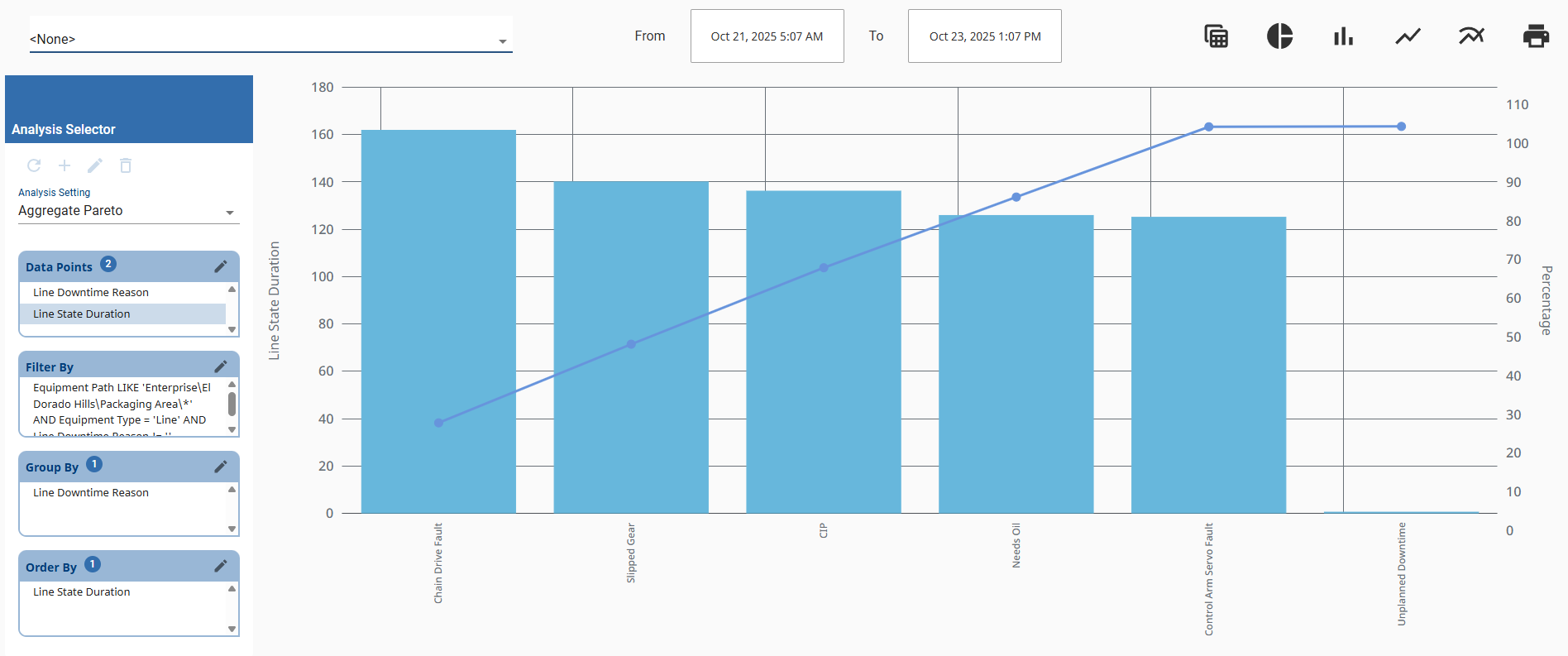
The OEE Downtime Module includes a built-in analysis engine that reads recorded data and calculates key values such as OEE, cycle times, and production counts. OEE Impromptu Analysis allows users to include data from multiple date ranges so results can be viewed on the fly. Data can then be grouped to narrow down inefficiencies. For example, a user might start by analyzing OEE downtime by shift, then add operator data to determine whether additional operator training is needed.
Results from OEE Impromptu Analysis can be used to create dashboards and add-on displays that make production information visible. Analyses can be kept private, shared with a group, or made public, depending on security settings. Analysis security options include permission settings for user roles that determine who can modify and/or execute the analysis. Users with modify permissions help prevent unwanted changes, while users with execute permissions can make analysis results visible to those contributing to efficiency improvement.
Live Analysis
For common production metrics that reflect up-to-the-minute conditions, Live Analysis is used to automatically recalculate analysis as production events occur or can recalculate at a configurable interval, whichever comes first. Each line and its sub-equipment (cells) can have multiple Live Analyses active that can be based on the day, shift, run, or custom time period. The analysis engine uses a proprietary caching algorithm to return the results in real-time.
Material Management
The Material Manager component allows you to easily define production settings and control the production line, cell groups, cells, etc. Make unique adjustments for each material and equipment combination down to the sub-equipment (cell) level. This enables your company to correctly set OEE production rates, select cells, and other settings to help your production run smoothly.
Multi-Site and Enterprise Scalability
Scale from one site to an entire enterprise without restructuring your system. Multi-site synchronization allows global teams to compare performance and share standardized downtime reasons, schedules, and KPIs while still maintaining local flexibility. This unified approach helps larger organizations drive consistent improvement across multiple facilities.
Built on ISA-95
The OEE module is built in compliance with the ISA-95 standard, providing a consistent model and terminology for production control and tracking. The ISA-95 standard has been vetted by many manufacturers and applied to many processes and has been proven valuable over many years. ISA-95 compliant Sepasoft MES Modules include OEE Downtime, Track & Trace, and Settings & Changeover. Sepasoft uses ISA-95 to provide seamless integration between lot tracking, production control, OEE, and downtime tracking solutions. ISA-95 compliance allows you to utilize an open standard (as opposed to a vendor’s proprietary system) providing you the ability to share data with an ERP or other business systems.
Seamless Integration and Data Reliability
Integrate easily with ERP and IIoT systems to ensure consistent data flow across operations. The module’s store-and-forward design guarantees data reliability during network interruptions. Information can be exported, imported, or analyzed externally, while detailed audit logs maintain accuracy and compliance with industry standards.
Built on the Ignition® platform by Inductive Automation, the OEE Downtime Module takes advantage of Ignition’s modern architecture, flexible scripting, and unlimited licensing model. This native integration allows OEE data to flow directly within your Ignition projects, providing a single, connected environment for MES, SCADA, and enterprise systems.

OEE Downtime Features
Quickly identify and focus your efforts on the top downtime reasons affecting your operating efficiency.
| Feature | Benefit | Standard | Enterprise |
| Downtime Analysis | Accurately determine the root cause for loss of production with advanced downtime detection algorithms. |  | |
| Easy Ad-Hoc Analysis | Pinpoint production inefficiencies with customizable ad-hoc analysis, allowing users to select unique combinations of data values, filters, groupings, and orders. | | |
| Post-Run Corrections | Keep KPIs, analysis results, and historical data accurate with the ability to adjust previously collected production data. | | |
| Chart & Table Drill Down | Achieve a deeper understanding of OEE analysis with chart and table drill-down functionality. | | |
| Historical Analysis | Identify downtime trends and target areas for improvement by retaining and analyzing unlimited amounts of past production data. | | |
| Record Custom Data Items | Evaluate how non-OEE factors (e.g. vendor, tooling) are affecting efficiency by incorporating custom data items into your analysis. | | |
| Automated Production Reports | Reliably communicate OEE results across the organization by integrating with Ignition Reporting to automatically generate and send reports via email or other methods. | | |
| Multiple Site Analysis and Reporting | Monitor production efficiency across all operations of your global enterprise by comparing OEE and production results across sites and production areas. | |
Drive continuous improvement by responding to production issues in real-time.
| Feature | Benefit | Standard | Enterprise |
| Real-Time OEE Scores | Respond to production issues as they happen with live notifications and visual feedback showing overall OEE, availability, performance, and quality scores. | | |
| Dynamic Dashboards | Share meaningful information using real-time custom dashboards tailored to the needs of your company. | | |
| Real-Time Equipment Data Collection | Minimize error and reduce manual input by capturing equipment data automatically, freeing up operators to focus on their primary task of producing product. | | |
| Equipment Timing Chart | Determine the root cause of downtime events and optimize material flow by visualizing interactions between line equipment. | | |
| Live KPIs | Configure custom Key Performance Indicators (KPIs) that will best help your organization improve production efficiency. | | |
Easily adapt to organizational growth with a unified MES solution that supports change over time. Sepasoft MES expands from the edge-of-network up to a global enterprise with no rework or loss of data.
| Feature | Benefit | Standard | Enterprise |
| MES Server Health Monitoring | Detect and resolve system issues before they cause loss of production with out-of-the-box health monitoring tools. | | |
| IIoT/MQTT Functionality | Prevent the loss of historical data, optimize network bandwidth, and improve security by capitalizing on IIoT, with built-in MQTT and OPC/UA support. | | |
| Unlimited Lines per Site Licensing | Scale your MES system as your organization grows without significant licensing costs or hidden fees. Unlike alternatives, a Sepasoft site license includes unlimited lines and machines. Users, screens, reports, and field device connections are unlimited within a site license. | | |
| Multiple Site Production Data Synchronization | Improve visibility and reliability throughout the enterprise by easily sharing schedules, production results, and more across multiple sites and servers. With out-of-the-box functionality, integration labor and custom coding are significantly reduced. | | |
| Multiple Site Configuration Synchronization | Simplify the configuration process with automatic synchronization across multiple sites and servers. Minimize duplicate entry, misconfigurations, and other entry mistakes without custom coding. | |
Customize system configuration to meet the unique requirements of your organization.
| Feature | Benefit | Standard | Enterprise |
| Automatic, Manual, or Hybrid Data Collection | Reduce operator workload with automatic data collection, with the option to collect valuable details manually. With the flexibility to collect data automatically, manually, or through a hybrid process, all relevant OEE information is captured. | | |
| Data Export/Import Capability | Enjoy the freedom to use production data however you choose. Optionally, export and import data with external systems for further analysis or configuration. | | |
| Material Management | Keep your key performance indicators (KPIs) accurate by configuring unique rates and settings for each material-equipment combination. | | |
| Manage Documents & Artifacts | Ensure the correct versions of materials safety data sheets (MSDS), work instructions, travelers, and more are available when needed. Attach additional data files (e.g. images, PDFs, etc.) to schedules, work orders, materials, equipment, and more. | | |
| Configurable Equipment Modes | Track asset utilization by configuring user-defined equipment modes that are most meaningful to your manufacturing process. User-definable modes can be anything but typically include changeover, set up, R&D, production, maintenance, and idle. | | |
| Equipment Manager Component | Easily configure your equipment hierarchy in an intuitive representation of your plant floor. Define state, mode, and other settings unique by site, area, line, machine, and more. | | |
| Detailed Changelog | Automatically record all changes made to any MES configuration to help you meet the challenges of regulatory compliance. Quickly zero in on significant changes with access to a complete audit trail of the location, date, type of change, responsible person, and more. | | |
| Multi-Database Vendor Support | Simplify implementation by selecting the database vendor that best fits into your existing IT standards. | | |
| ISA-95 Alignment | Built on industry standards for equipment models and data structures, ensuring consistency and easy integration across MES and enterprise systems. | | |
Achieve production goals by tracking progress and monitoring production conditions using live visual feedback.
| Feature | Benefit | Standard | Enterprise |
| Running Changeover | Accurately track production counts and other key data when running multiple products on a line. Leverage built-in OEE algorithms that support running changeovers with two or more products running on a line simultaneously. | | |
| Flexible Shift Configuration | Accurately predict production outcomes that match your shift schedules with flexible shift configuration, including rotating shifts and holidays. | | |
| Live Plant Floor Scheduling | Determine whether you’re on track to meet production targets at any given moment. Plant floor scheduling is automatically updated and forecasted based on live production conditions, providing you constant feedback on the status of operations. | | |
| Scheduling Analysis | Analyze past production runs to identify trends and carry forward successful practices to future operations and scheduling. | | |
| Work Order Management | Fulfill production targets by tracking the real-time status of work orders, including units scheduled, produced, and remaining. Work orders spanning multiple runs or lines can be viewed in aggregate, providing the ability to review the work order as a whole. | | |
Transition from isolated systems and data silos to a coordinated, full-featured MES. With Sepasoft’s modular design, business systems of different functional areas can work together in harmony for greater insight.
| Feature | Benefit | Standard | Enterprise |
| Automatic Machine Settings Management | Manage machine settings to prevent quality issues and downtime. Identify deviations as they happen and quickly resolve critical issues with role-based management. To learn more, visit our Machine Settings Management (formerly Recipe & Changeover) product page. | | |
| Document Management | Securely and easily manage production-related documents that are critical to safety, quality, and overall production efficiency. Build and distribute documents that operators can fill out and save with MES data for the historical record. To learn more, visit our Document Management product page. | | |
| Synchronization to ERP Systems | Connect to your ERP or higher-level business system without custom development or the burden of maintaining high volumes of the script over time. Complicated scripts are replaced by a user-friendly visual interface to sequence communication and map data between systems. To learn more about ERP synchronization, visit our Interface for SAP ERP product page. To learn more about business systems connectivity, visit our Sepasoft Business Connector product page. | | |
| Integrated Quality Tracking | Minimize waste and rework by catching quality issues early in the production process. Identify out-of-control variations with automatic alerts to resolve them before they become bigger (and more costly) problems. To learn more, visit our SPC product page. | | |
| Integrated Traceability | Rapidly recall material genealogy from raw materials to finished goods, including real-time WIP inventory on the plant floor. To learn more, visit our Track & Trace product page. | | |
| Compatible with Ignition | Save hours of customization by managing MES, SCADA, HMI, and more on a single platform with a unified operator interface and design tools. To learn more about the Ignition Platform, visit Inductive Automation’s Ignition Platform product page. | | |
Excited to learn more? Reach out to us and schedule your live demo today!