
Batch Procedure
Standardize real-time execution across people, equipment, and procedures.

Batch Control Built for Real Operations
Sepasoft’s Batch Procedure Module is batch management software for ISA-88 recipe modeling, batch execution, and procedure-based work instructions. Define master recipes, operations, and phases, coordinate unit procedures and equipment phases, and generate electronic batch records (EBRs) with a complete production history.
What Sets Sepasoft Batch Apart
Sepasoft Batch Procedure gives manufacturers a more adaptable foundation than traditional batch systems, with a clearer path into broader MES capabilities over time.
Equipment Control & Beyond
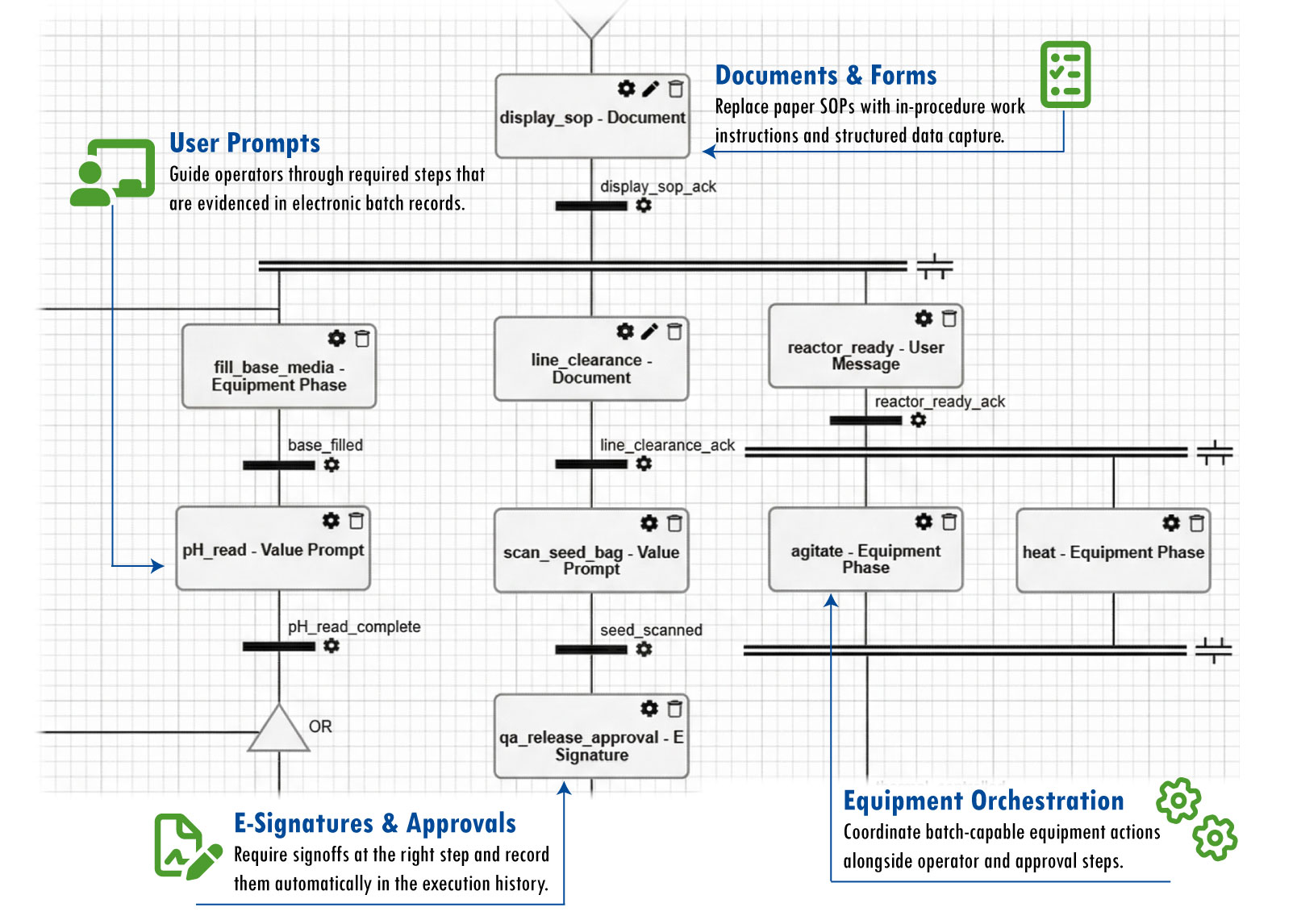
Combine equipment phases, procedural logic, and manual operator tasks within the same recipe.
Process & Equipment Separation
Manage recipe flow, operator steps, and approvals in the procedure layer so PLCs stay focused on equipment control.
Evidenced Operator Steps
Require operator actions and approvals at the right step, then capture them as part of the batch record.
Batch Execution on Ignition
Built natively on Inductive Automation’s Ignition® platform, unifying batch with SCADA, HMI, and control.
Built for MES Expansion
Start with batch and add integrated MES capabilities like traceability, quality, and analytics as your operation grows.
Unlimited Units per Server
Scale batch procedures across unlimited units on a licensed server, without per-unit or per-recipe fees.
Flexible Procedure Orchestration
Build procedures around how your process actually runs, whether execution is driven by equipment, guided operator steps, or a combination of both.
Classic Batch
Automation-heavy processes centered around equipment phases that carry the batch from start to finish.
MACHINE
Fill Base Media
MACHINE
Heat to 80°C
MACHINE
Agitate High Speed
MACHINE
Transfer to Storage
Workflow
Processes driven primarily by operator actions, documents, prompts, approvals, and other procedural steps.
HUMAN
Scan Raw Materials
HUMAN
Confirm Scale Zero
HUMAN
QA Verification
HUMAN
E-Signature Release
Hybrid
Processes that combine equipment phases, operator actions, and supporting procedure logic in the same flow.
MACHINE
Auto-Dose Solvent
HUMAN
Add Catalyst
MACHINE
Timed Mix
HUMAN
Take Lab Sample
Visual Recipe Authoring
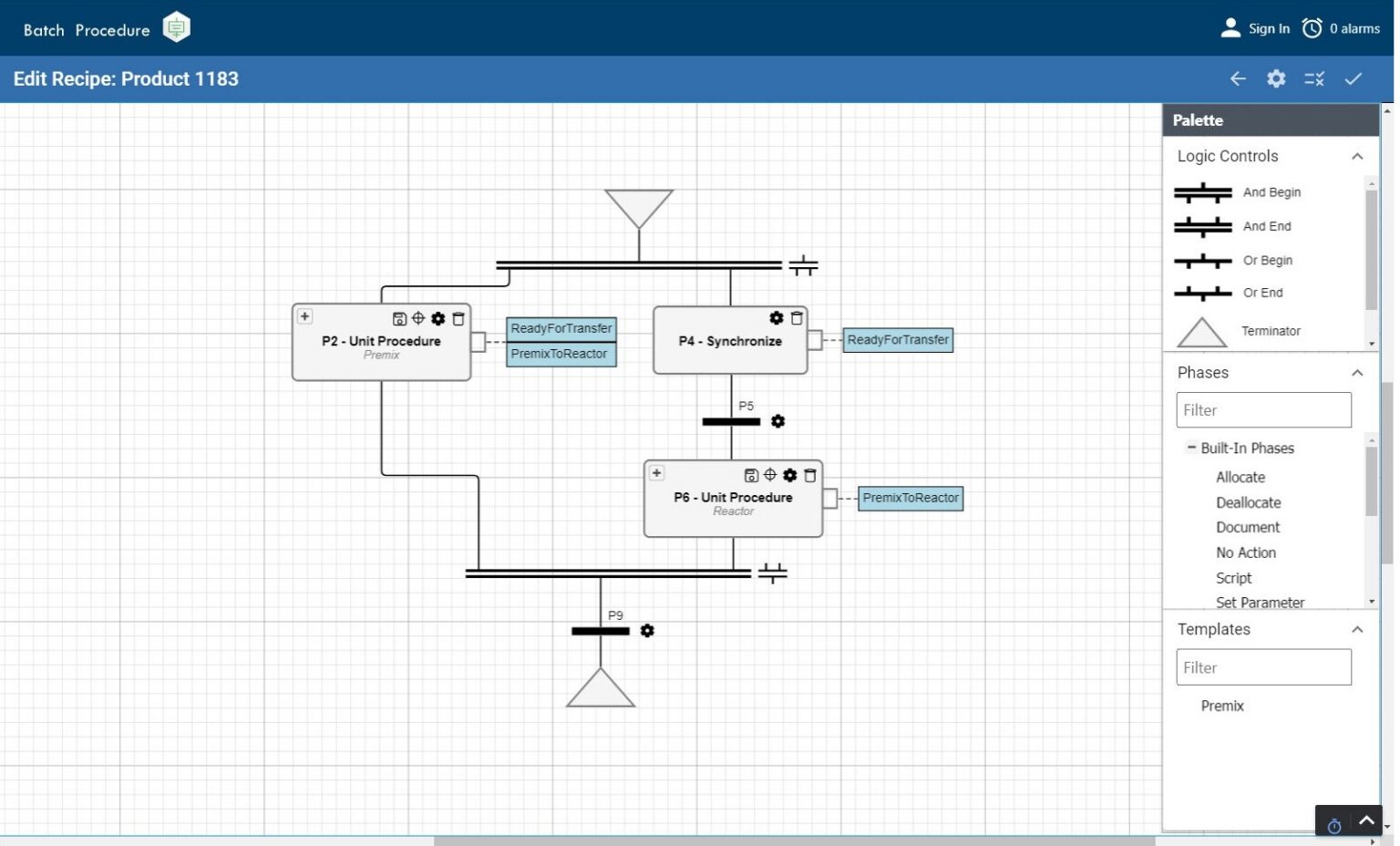
Graphical Recipe Editor
Design and modify recipe logic in a visual editor rather than custom PLC or middleware code. Reusable phases and procedure elements help standardize execution without rebuilding logic for every line or asset.
Live Monitoring
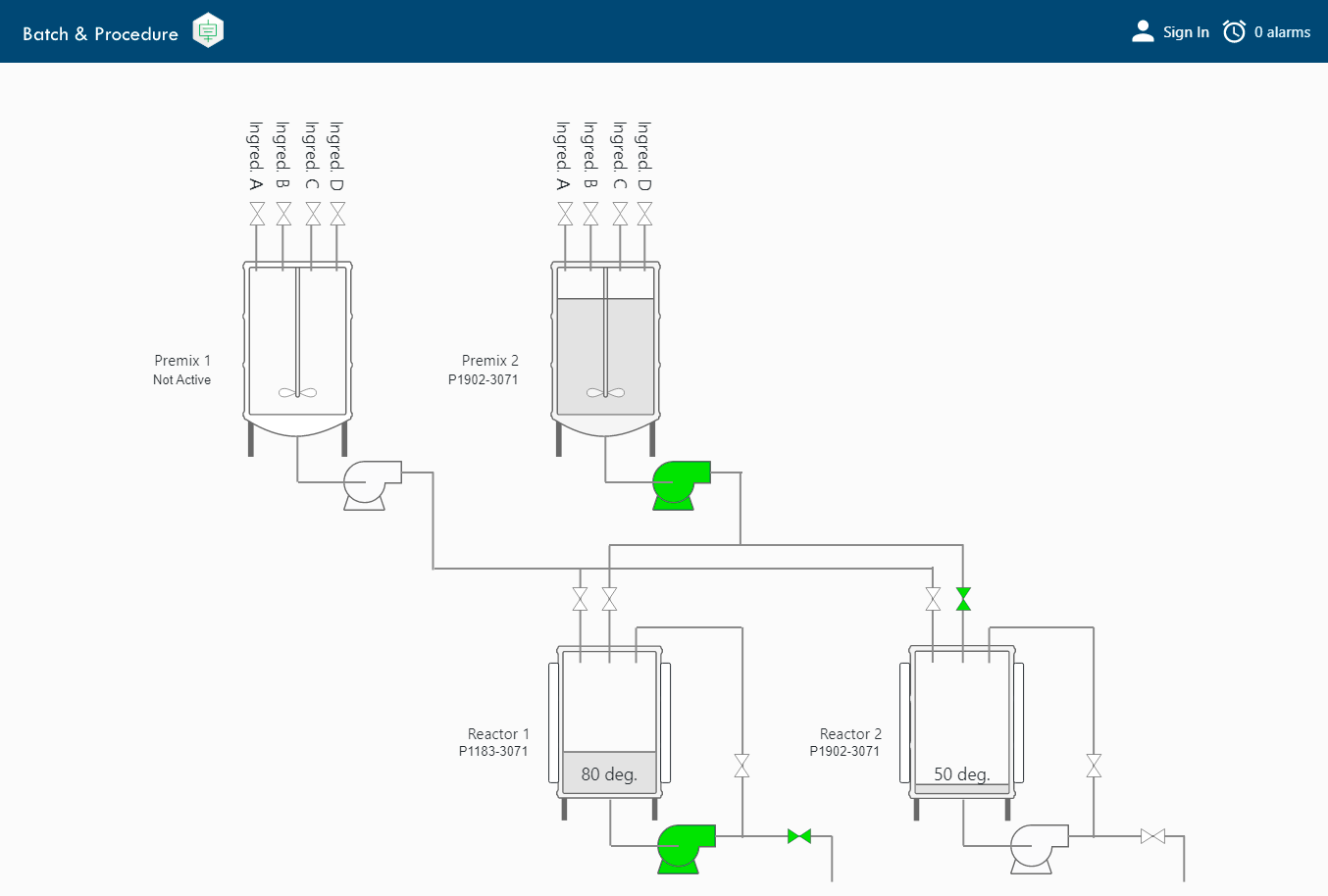
Real-Time Batch Status
Monitor active batches, equipment states, and phase progression through Ignition HMI screens. Operators and engineers can see exactly what is running, where it is in the process, and how equipment is responding without relying on manual updates or external tools.
GUIDED EXECUTION
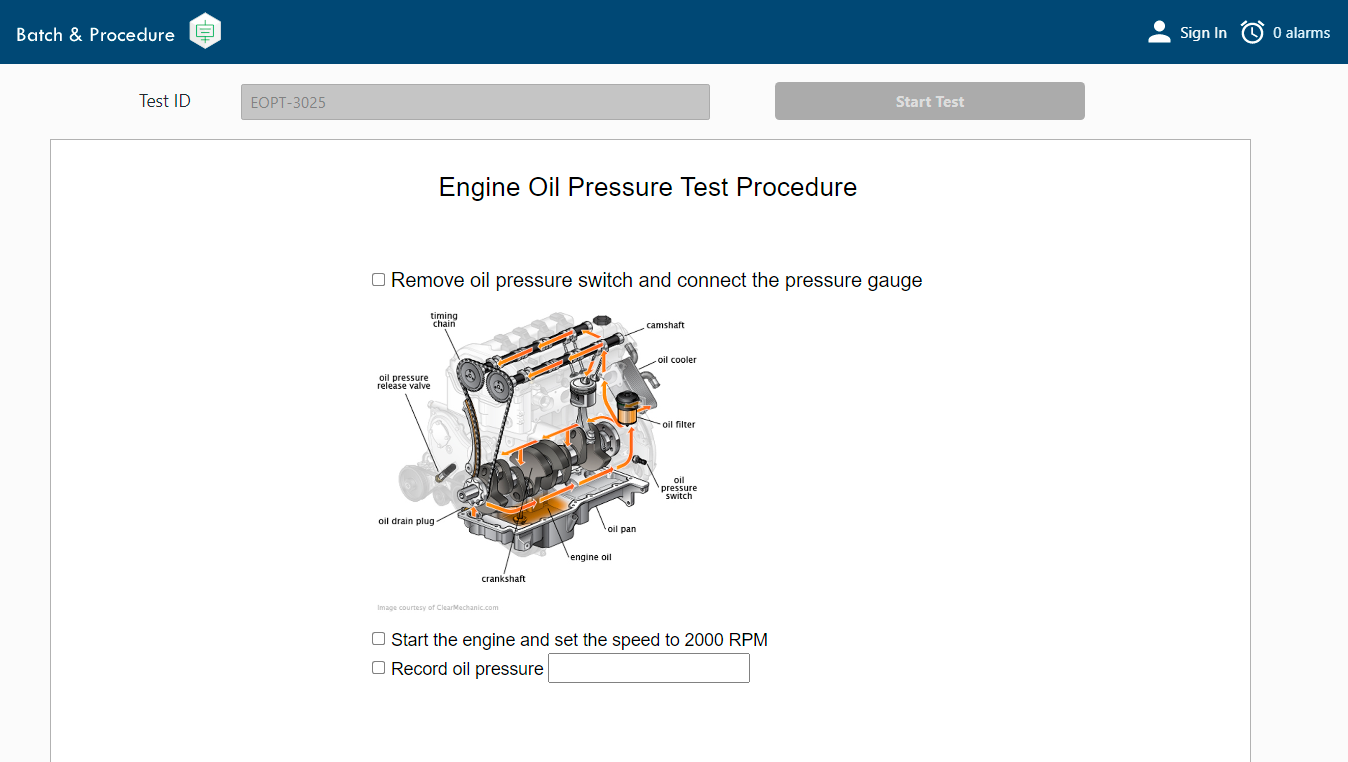
Controlled Documents & Forms
Present SOPs, work instructions, checklists, and data-entry forms within the procedure where operators need them. Maintain the appropriate document version, capture required manual information in context, and retain completed records with the batch history.
PRODUCTION TRACEABILITY
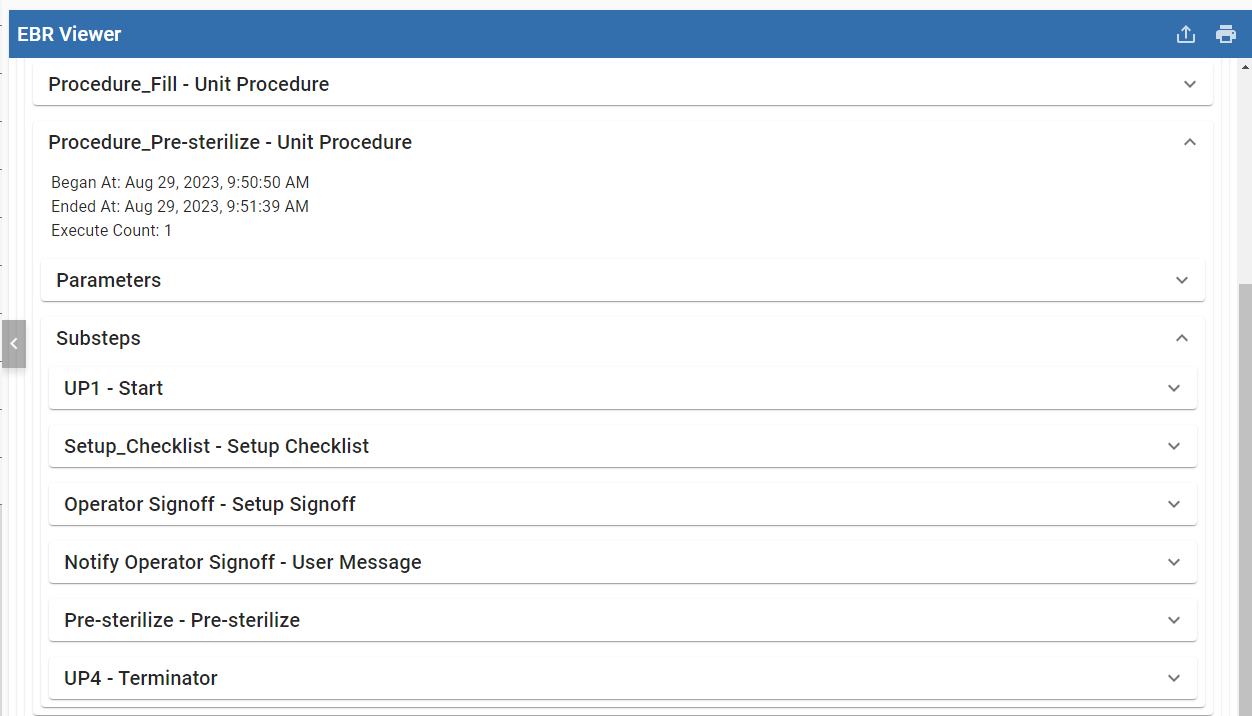
Electronic Batch Records
Every step in the procedure—including operator actions, approvals, and completed forms—is automatically captured as it happens, creating a consolidated, reviewable record of each run that supports quality, traceability, and compliance.
Unified Procedure Model
Build executable procedures that combine equipment phases, approvals, documents, and operator steps within one governed ISA-88 engine.
More Features
Reusable Templates
Template unit procedures and operations to reduce repetitive setup and accelerate recipe development across lines and sites.
Built-In Script Phases
Add custom batch behavior directly in the recipe without shifting logic to PLCs or external middleware.
User-Defined Batch Parameters
Create parameters with custom calculations, data types, and value limits to reflect the needs of each process.
Controlled Execution Points
Maintain control over real-world variability with defined points that allow operators or logic to pause, resume, or redirect a batch.
Multi-Site Deployment
Standardize and deploy governed batch procedures across sites to ensure consistent production everywhere.
Secure Audit Trails
Automatically record batch actions and execution history to support traceability and 21 CFR Part 11 compliance.
Batch Analysis
Analyze batch data with flexible filters, groupings, and comparisons to identify trends and pinpoint sources of inconsistency.
Flexible Batch Formulas
Manage material and parameter variations without altering core recipe logic, enabling safe product adjustments and repeatability.
Reusable Equipment Classes
Define equipment capabilities once and reuse them across units for faster, more consistent recipe setup.
See It In Action
Explore demos, pricing, and real-world examples of how manufacturers use Batch Procedure.
Explore the Public Demo
See how Batch Procedure guides batch operations with material verification, monitoring, and traceability.
Pricing & Licensing
Use our pricing calculator to build a quote and explore supporting MES modules.
Batch Case Studies
Learn how manufacturers standardize processes and digitize batch records with Batch Procedure.
Batch Procedure Feature Table
Explore the full technical feature set of Batch Procedure, categorized to support detailed engineering review and system architecture planning.
Ease of Use
Designed with the user in mind, the Batch Procedure Module is modern, intuitive, and user-friendly. Minimize tedious configuration, thereby reducing development labor and allowing each individual to focus on their primary tasks.
FEATURE
DESCRIPTION

ELECTRONIC SIGNATURES
Promote accountability and compliance within your manufacturing process by evidencing approvals with electronic signatures. Incorporate any number of e-signatures from various roles into your batch recipe to ensure that approvals are properly documented for historical record.
GRAPHICAL RECIPE EDITOR
Simply edit recipes on one user-friendly screen using modern drag-and-drop technology. With less system training and development labor required, Recipe Authors and Operations staff can more easily focus on the product.
PROCESS & EQUIPMENT SEPARATION
Empower Recipe Authors and Control Systems Engineers to specialize in their independent roles. With the separation of Recipes and Equipment Control, the cost of engineering and training is lowered throughout the life cycle of the manufacturing process.
REUSABLE TEMPLATES
Unit procedures or operations can be templated and reused for faster and easier development of recipes. Using this functionality, less time is spent on avoidable and repetitive configuration tasks.
BUILT-IN PHASES
Reduce development labor for each new recipe by utilizing standardized phases for frequently used tasks, such as displaying user messages, inventory checks, inventory updates, and more.
RAPID TAG MAPPING TO FIELD DEVICES
Expedite the tag configuration process and minimize manual error with the ability to automate mapping to field devices. Any change to phase parameters results in automatic updates to all units referencing that phase.
LOCAL PROCESSING CAPABILITY
Speed up the implementation process with the capability to execute phases locally on the batch server. Phases such as operator instructions and timers can be configured locally on the batch server without unnecessary and tedious mapping to PLCs.
GRAPHICAL UNIT CONFIGURATION
Intuitively arrange units in a graphical representation of the plant floor. Easily drag-and-drop to show unit connections and material transfer workflows.
Production Control
Achieve production goals by tracking progress and monitoring production conditions using live visual feedback. Standardize product results and minimize waste by ensuring the correct materials, equipment, and personnel are utilized at each step in the production process.
FEATURE
DESCRIPTION
BATCH PROCEDURE USE CASES
Control ISA-88 batch processes, manufacturing procedure-driven workflows, and hybrid processes in one toolset. Simplify maintenance and lower the total cost of ownership with a unified solution that easily fits into different types of protocols and workflows.
BUILT-IN UDT INTERFACE
Streamline configuration and minimize error with access to a built-in UDT interface. Map a UDT to field equipment once, and every instance of this UDT will be automatically configured going forward.
SIMULTANEOUS RECIPE RUNS
Maximize equipment utilization by running multiple recipes simultaneously. Units can be intelligently allocated automatically, manually assigned, or a hybrid combination of the two.
USER PROMPTS & MESSAGE HANDLING
Create a more consistent, repeatable process by prompting operators with messages and instructions to guide equipment interactions.
BATCH EXECUTION POINT
Guide execution with defined points that allow operators or logic to pause, resume, or redirect a batch as needed. Maintain control over real-world variability while keeping processes consistent and traceable.
DOCUMENT MANAGEMENT
Securely manage production documents within batch procedures to make complex manual processes more repeatable and consistent. Build and distribute forms, work instructions, and checklists that operators can complete and save with batch data for the historical record.
WIP INVENTORY
Fulfill production targets by tracking real-time inventory based on customizable criteria such as material type, equipment type, material status, and more.
Real-Time Results
Drive continuous improvement and product consistency by responding to production issues in real-time. Preserve the quality of each batch by identifying and resolving issues before it’s too late.
FEATURE
DESCRIPTION
INTEGRATED IGNITION HMI
Sepasoft Batch is built for Ignition, so operators can monitor batch status, complete procedure steps, and interact with equipment directly from Ignition HMI screens without a separate HMI solution or extensive custom tag mapping.
REAL-TIME BATCH STATUS
Enable operators to easily check the status of a batch without an SFC (PFC) chart. With less navigation and drill-down required to monitor a batch, operators can focus on production.
DYNAMIC DASHBOARDS
Share meaningful information using real-time custom dashboards tailored to the needs of your company.
REAL-TIME EQUIPMENT DATA COLLECTION
Minimize error and reduce manual input by capturing equipment data automatically, freeing up operators to focus on their primary task of producing product.
Scalability
Easily adapt to organizational growth with a unified MES solution that supports change over time. Sepasoft MES expands from the edge-of-network up to a global enterprise with no rework or loss of data.
FEATURE
DESCRIPTION
Limited by server performance and available system resources
UNLIMITED UNITS PER SERVER LICENSE
Expand your batch implementation on a licensed server without purchasing additional unit, line, or recipe licenses as your operation grows.
MULTI-SITE PRODUCTION DATA SYNC
Improve visibility and reliability throughout the enterprise by easily sharing schedules, production results, and more across multiple sites and servers. With out-of-the-box functionality, integration labor and custom coding are significantly reduced.
MULTI-SITE CONFIGURATION SYNC
Simplify the configuration process with automatic synchronization across multiple sites and servers. Minimize duplicate entry, misconfigurations, and other entry mistakes without custom coding.
REDUNDANCY
Prevent disruption of mission-critical batch operations with a reliable solution enabling redundancy. In the event a server experiences technical failure, a second redundant server seamlessly takes over and continues executing automatically.
RAPID DISASTER RECOVERY
All batch configuration data is synchronized with other servers in your MES architecture, providing an up-to-the-minute production data backup. Any server within your MES architecture can be rapidly restored to production state without incurring any loss of data.
MES SERVER HEALTH MONITORING
Detect and resolve system issues before they cause loss of production with out-of-the-box health monitoring tools.
Analysis & Reporting
Optimize your batch process by analyzing large quantities of high-quality data to determine which factors produce the most success.
FEATURE
DESCRIPTION
ELECTRONIC BATCH RECORDS
Ensure that critical procedures are followed and automatically documented to evidence the results of each process step. These details are saved into electronic batch records and easily viewed alongside quality and traceability data documents.
EASY AD-HOC ANALYSIS
Pinpoint the source of quality issues and inconsistency with customizable ad-hoc analysis, allowing users to select unique combinations of data values, filters, groupings, and orders.
HISTORICAL ANALYSIS
Identify trends and target areas for improvement by retaining and analyzing unlimited amounts of past production data.
AUTOMATED PRODUCTION REPORTS
Reliably communicate results across the organization by integrating with Ignition Reporting to automatically generate and send PDF reports via email or other methods.
MULTI-SITE ANALYSIS & REPORTING
Monitor consistency across all operations of your global enterprise by comparing quality results across sites and production areas.
Flexibility
Customize system configuration and batch processes to meet the unique requirements of your organization.
FEATURE
DESCRIPTION
USER-DEFINED BATCH PARAMETERS
Create custom parameters to properly reflect your organization’s batch process. Define the tag type, custom calculations, data types, minimum/maximum values, and more.
MULTIPLE TRANSFER METHODS
Choose from multiple material transfer methods to best reflect existing equipment in the field. With the ability to run different recipes on each unit, the Batch Procedure Module easily adapts to your organization’s existing processes.
CUSTOM PARAMETER CALCULATIONS
Factor your organization’s custom requirements into batch parameters with dynamic calculations. Calculate ingredient quantities based on concentration, determine mix time based on humidity or temperature, and much more.
BATCH FORMULAS
Flexibly manage Batch Recipe variations, enabling material and settings adjustments without altering core process logic. Simple modifications like color change can be effortlessly implemented and saved for future use.
USER-DEFINED SCRIPT
Incorporate user-defined script into any recipe for customization beyond out-of-the-box functionality, such as queries to external systems, complex calculations, database queries, and more.
SIMPLIFIED VALIDATION PROCESS
Simplify compliance validation using built-in tools such as versioning and a detailed changelog to target specific validation areas rather than revalidating the total process. All changes made to batch configuration are automatically recorded in a complete audit trail evidencing the location, date, type of change, responsible person, and more.
AUTOMATIC DATA COLLECTION
Reduce operator workload with automatic data collection, with the option to collect valuable details manually. With the flexibility to collect data automatically, manually, or through a hybrid process, all relevant information is captured.
DATA EXPORT/IMPORT CAPABILITY
Enjoy the freedom to use production data however you choose. Optionally, export and import data with external systems for further analysis or configuration.
MULTI-DATABASE VENDOR SUPPORT
Simplify implementation by selecting the database vendor that best fits into your existing IT standards.
DOCUMENT VERSIONING & ATTACHMENTS
Ensure the correct versions of material safety data sheets (MSDS), work instructions, travelers, and more are available when needed. Attach additional data files (e.g. images, PDFs, etc.) to schedules, work orders, materials, equipment, and more.
MULTI-ENVIRONMENT DEPLOYMENT
Apply system updates in a controlled, staged manner without impacting the running system. Review and validate changes before deployment to reduce risk and maintain consistency across Dev, Test, and Production environments.
Extensibility
Transition from isolated systems and data silos to a coordinated, full-featured MES. With Sepasoft’s modular design, business systems of different functional areas can work together in harmony for greater insight.
FEATURE
DESCRIPTION
SCADA/HMI INTEGRATION
Save hours of customization by managing MES, SCADA, HMI, and more on a single platform with a unified operator interface and design tools. Learn more about Inductive Automation’s Ignition Platform.
ERP SYNCHRONIZATION
Connect to your ERP or higher-level business system without custom development or the burden of maintaining high volumes of script over time. Complicated scripts are replaced by a user-friendly visual interface to sequence communication and map data between systems. Learn more about Sepasoft’s Business Connector Module.
MACHINE SETTINGS MANAGEMENT
Manage machine settings to prevent quality issues and downtime. Identify deviations as they happen and quickly resolve critical issues with role-based management. Learn more about Sepasoft’s Settings & Changeover Module.
INTEGRATED QUALITY TRACKING
Minimize waste and rework by catching quality issues early in the production process. Identify out-of-control variations with automatic alerts to resolve them before they become bigger (and more costly) problems. Learn more about Sepasoft’s SPC Module.
INTEGRATED TRACEABILITY
Rapidly recall material genealogy from raw materials to finished goods, including real-time WIP inventory on the plant floor. Learn more about Sepasoft’s Track & Trace Module.