
SepaIQ Finite Scheduling
Constraint-based production scheduling for real-world operations.

A Smarter Scheduling Approach
SepaIQ Finite Scheduling is an Advanced Planning and Scheduling (APS) solution that helps manufacturers build realistic, adaptable schedules around real operating constraints so plans stay aligned with actual production conditions.
FINITE CAPACITY SCHEDULING
What Better Scheduling Looks Like
Better scheduling starts with a plan grounded in real operating limits and continues with the flexibility to respond when priorities, materials, or equipment conditions change.
Constraint-Based Scheduling
Create schedules that reflect the real limits of production, from equipment and labor availability to materials and changeover requirements.
Optimize What Matters
Shape schedules around the outcomes your operation values most, from on-time delivery and throughput to utilization and changeover efficiency.
Live Production Feedback
Keep schedules aligned with shifting priorities, disruptions, material updates, and other changing production conditions.
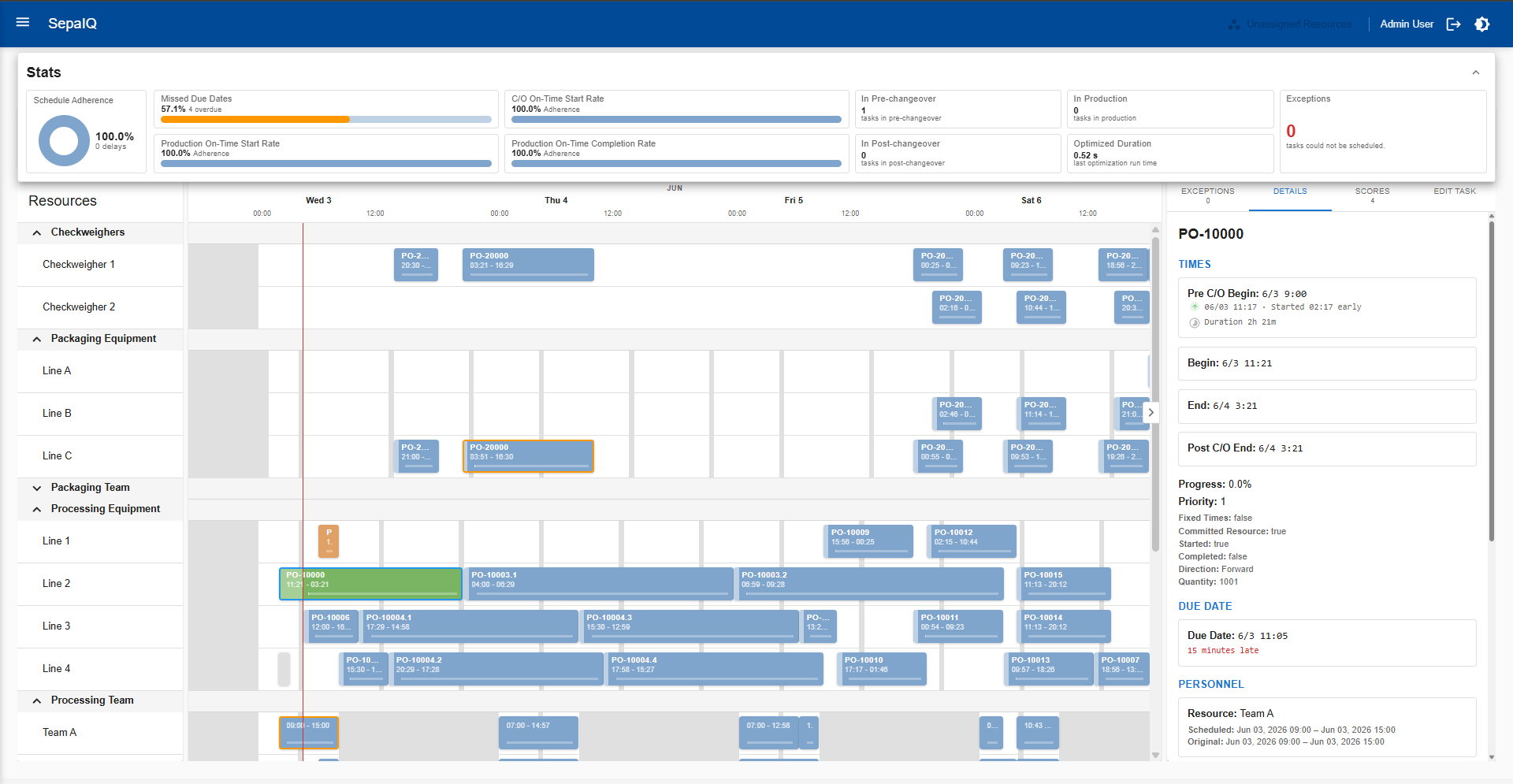
A Clear View of the Current Schedule
Visualize resources, timing, conflicts, constraint scores, and exceptions in one place so planners can understand the current schedule, evaluate issues faster, and make informed adjustments with greater confidence.
Core Scheduling Capabilities
Explore the scheduling logic, planning controls, and production inputs that help turn a schedule from a timeline into an executable plan.
Schedule Optimization
Use configurable priorities, scoring logic, and optimization goals to guide how schedules are built, balanced, and adjusted.
- Balance due dates, throughput, utilization, and changeovers
- Set optimization goals, scoring rules, and custom constraints
What-If Scenario Planning
Test alternative production conditions before making a change so teams can understand scheduling impact more clearly.
- Evaluate the effect of capacity, material, or priority changes
- Review impacts to material needs, resource load, or timing risks
Changeover & Sequencing
Model sequence-dependent changeovers and production flow rules so schedules better reflect how work actually moves through production.
- Reduce unnecessary changeovers and sequencing inefficiencies
- Account for pre-, post-, fixed, and product-specific changeover logic
Material-Aware Scheduling
Keep schedules grounded in material readiness by accounting for inventory, expected receipts, lot usage, expiration, and approved substitutes.
- Prevent tasks from being scheduled before required materials are ready
- Incorporate lot, shelf-life, and alternate-material considerations
Task Dependencies
Coordinate upstream and downstream work using dependency logic that reflects real production relationships between tasks, resources, and timing.
- Model after-start, after-completion, and multi-task dependencies
- Reduce delays caused by sequencing gaps and handoff timing issues
Connected Production Updates
Bring execution feedback into the scheduling process so schedule decisions can reflect current operating conditions across connected systems.
- Pull in status, resource, and material updates from MES, SCADA, and ERP
- Support faster schedule adjustments with better operational context
HOW IT WORKS
What Makes the Schedule Work
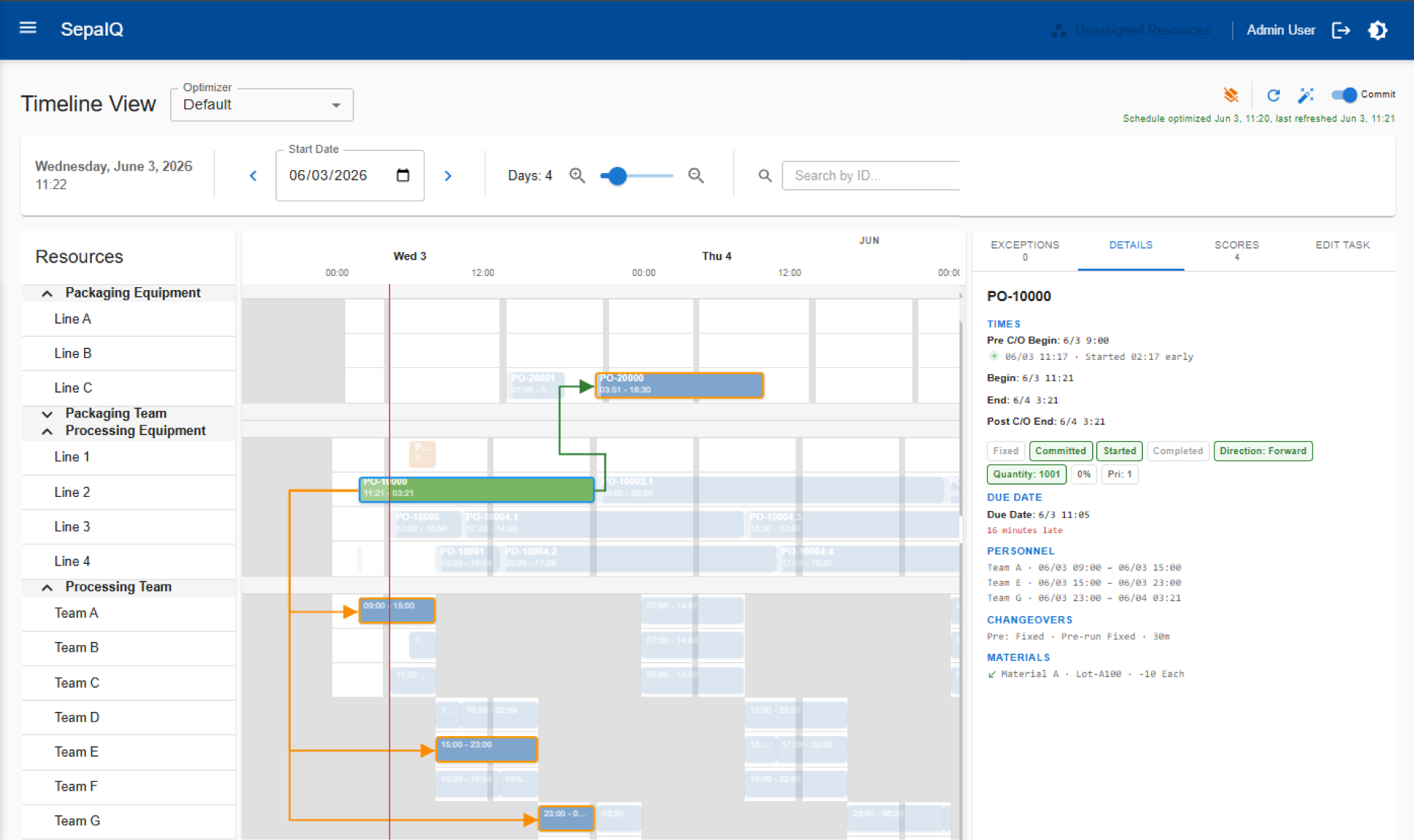
Go beyond the timeline view to see the logic behind the schedule. Connect tasks, resources, materials, changeovers, and status so planners can understand why work is scheduled where it is.
Task Dependencies | Resource Assignments | Materials & Changeovers | Task Status
Built on the SepaIQ Platform
Powered by the SepaIQ Platform, Finite Scheduling extends beyond schedule generation with the analytics, connectivity, scalability, and machine learning foundation needed to support more informed planning. Learn more about SepaIQ
Scheduling Analytics
Measure schedule performance, compare outcomes, and identify what is driving delays, lost capacity, and missed targets.
Machine Learning
Support better scheduling decisions with machine learning that helps identify patterns and improve forecasting over time.
Flexible Connectivity
Connect scheduling to ERP, MES, SCADA, databases, and other systems. Native integration is available for Ignition® by Inductive Automation.
Enterprise Operations
Extend scheduling across multiple sites and larger operations with architecture built to support growing workloads, shared visibility, and broader coordination.
Explore SepaIQ Finite Scheduling
Finite Scheduling Features
A quick reference for module selection and architecture planning.
Scheduling Engine & Optimization
Build optimized schedules around real production capacity, constraints, priorities, and planning objectives.
FEATURE
DESCRIPTION

FINITE-CAPACITY SCHEDULING
Build schedules around the actual capacity of machines, work centers, labor, tools, and other constrained resources.
FORWARD SCHEDULING
Schedule production from the earliest available start time based on current resource and material constraints.
BACKWARD SCHEDULING
Schedule backward from a required due date to determine when each operation must start.
CONFIGURABLE PRIORITY RULES
Prioritize orders using factors such as due date, customer priority, rush status, order value, or custom business rules.
CONFIGURABLE CONSTRAINT SCORING
Configure how the scheduler evaluates competing constraints to favor outcomes such as fewer late orders, higher throughput, better utilization, or reduced changeover time.
EARLIEST COMPLETION
Generate schedules that complete the full production plan as early as possible.
MINIMIZE CHANGEOVERS
Sequence production to reduce setup time, cleanup time, and unnecessary product transitions.
MINIMIZE LATE ORDERS
Prioritize schedules that reduce late orders and improve due-date performance.
FROZEN SCHEDULING HORIZON
Protect near-term production from changes while allowing future schedule periods to remain flexible.
CUSTOM SCHEDULING LOGIC
Support specialized scheduling rules for unique production processes, constraints, or business requirements.
Routings & Dependencies
Model the production steps, routings, dependencies, and timing rules needed to build realistic schedules.
FEATURE
DESCRIPTION
WORK ORDER SCHEDULING
Schedule production orders using order details, quantities, due dates, routings, and required resources.
OPERATION-LEVEL SCHEDULING
Schedule individual operations within a work order for more precise control over production flow.
MULTI-STEP ROUTINGS
Model production processes that require multiple sequential or parallel operations.
ALTERNATE ROUTINGS
Define approved alternate production paths with routing-specific constraints, priorities, and resource preferences so the scheduler can select the best viable option.
ALTERNATE RESOURCE RATES
Schedule work across alternate machines or work centers while accounting for differences in speed, capacity, or efficiency.
MULTIPLE DEPENDENCIES
Model complex relationships between operations, tasks, materials, equipment, and production steps.
PREDECESSOR & SUCCESSOR RULES
Define which operations must happen before, after, or in relation to other production steps.
DEPENDENCY & TIMING RULES
Configure required timing relationships between operations, including offsets, wait time, transfer time, overlap, queue, and slack.
MULTI-LEVEL PRODUCTION
Coordinate dependent production across components, sub-assemblies, and finished goods.
Resource Capacity & Calendars
Schedule work against real resource availability, calendars, downtime, and capacity limits.
FEATURE
DESCRIPTION
RESOURCE CALENDARS
Schedule against defined machine or work center availability, including operating hours and exceptions.
SHIFT CALENDARS
Account for shifts, breaks, holidays, and non-working periods when building schedules.
DOWNTIME & MAINTENANCE WINDOWS
Avoid scheduling production during fixed downtime, scheduled maintenance, or unavailable resource windows.
RESOURCE AVAILABILITY CONSTRAINTS
Prevent schedules from assigning work to unavailable or overcommitted resources.
RESOURCE LOAD & UTILIZATION VIEWS
Show how scheduled work affects resource capacity, utilization, and available time.
BOTTLENECK IDENTIFICATION
Identify constrained resources that limit throughput or create schedule risk.
Changeovers & Sequencing
Sequence production with setup, cleanup, sanitation, and product-to-product changeover requirements in mind.
FEATURE
DESCRIPTION
SEQUENCE-DEPENDENT CHANGEOVERS
Calculate setup or cleanup time based on the specific product-to-product transition.
SETUP MATRIX SUPPORT
Use defined setup rules to determine changeover time between products, grades, colors, or families.
SETUP & CLEANUP
Account for setup activities before production and cleanup activities after production.
FIXED & VARIABLE CHANGEOVERS
Model changeovers that use fixed durations, variable durations, or both.
CHANGEOVER TIMING RULES
Model changeover activities that may overlap, run in parallel, or follow a defined sequence.
CAMPAIGN SCHEDULING
Group related production together to reduce changeovers, improve flow, or support campaign-based manufacturing.
CLEANING & SANITATION
Schedule around cleaning, sanitation, and CIP requirements between production runs.
ATTRIBUTE-BASED SEQUENCING
Sequence production based on allergens, color, grade, or product family to reduce contamination risk and minimize cleanup.
CUSTOM CHANGEOVER LOGIC
Support specialized changeover rules for unique sequencing, setup, cleanup, sanitation, or production transition requirements.
Materials & Inventory
Account for material availability, lot requirements, substitutions, shortages, and expiration limits when building schedules.
FEATURE
DESCRIPTION
MATERIAL AVAILABILITY CHECKS
Confirm required materials are available before scheduling production.
MATERIAL REQUIREMENTS PLANNING
Forecast the materials and required dates for the optimized schedule so purchasing teams can coordinate deliveries with suppliers in advance.
LOT-BASED SCHEDULING
Schedule production and consumption using specific material lots or production lots.
AUTOMATIC LOT ASSIGNMENT
Assign available lots to scheduled work based on defined rules and availability.
CROSS-LOT CONSUMPTION
Allow production to consume from multiple lots when a single lot does not cover the full requirement.
SHELF-LIFE-AWARE SCHEDULING
Account for expiration dates, hold times, or shelf-life limits when scheduling materials and production.
ALTERNATE MATERIALS
Use approved substitute materials when preferred materials are unavailable.
MATERIAL PEGGING
Tie available materials to specific orders or operations so the scheduler knows which work can be completed with current inventory.
SHORTAGE VISIBILITY
Identify material shortages that prevent orders from being scheduled or completed on time.
Tools & Labor
Schedule work based on the availability, requirements, limits, and maintenance status of tools and personnel.
FEATURE
DESCRIPTION
TOOL AVAILABILITY
Schedule work only when required tools, molds, dies, fixtures, or other secondary resources are available.
TOOL CALENDARS
Account for tool-specific availability, downtime, maintenance, or reservation windows.
TOOL CATEGORIES
Assign work based on categories of tools rather than only specific individual tools.
SERIALIZED TOOL ASSIGNMENT
Reserve and track specific serialized tools for scheduled production tasks.
TOOL CYCLE LIMITS
Account for tool usage limits, cycle counts, or remaining allowable use before maintenance or replacement.
TOOL CALIBRATION
Prevent use of tools that are out of calibration or unavailable due to calibration requirements.
TOOL MAINTENANCE
Avoid assigning tools that are scheduled for maintenance or unavailable for service reasons.
PERSONNEL AVAILABILITY
Schedule work based on when required operators, technicians, or other personnel are available.
CREW SCHEDULING
Schedule groups of people together when a task requires a defined crew or team.
MULTI-PERSON TASKS
Account for tasks that require more than one person at the same time.
ABSENCE-AWARE SCHEDULING
Avoid assigning work to unavailable personnel due to absences, time off, or unavailable shifts.
Interactive Planning & Analysis
Give planners the tools to view, adjust, compare, and analyze schedules before committing changes to production.
FEATURE
DESCRIPTION
INTERACTIVE GANTT SCHEDULING
View and adjust the schedule in a visual timeline that shows orders, operations, and resource assignments.
DRAG-AND-DROP EDITING
Allow planners to manually adjust scheduled work while seeing the impact of changes.
WHAT-IF SCENARIO PLANNING
Test alternate schedules before committing changes to production.
SCHEDULE KPIS
Track key scheduling metrics such as on-time performance, utilization, idle time, and late orders.
SCHEDULE TRANSPARENCY
Visualize resources, timing, conflicts, constraint scores, and exceptions so planners can understand why work is sequenced as it is and evaluate adjustments with confidence.
LATE AND AT-RISK ORDERS
Highlight orders that are late, likely to be late, or affected by constraints.
CAPACITY LOAD CHARTS
Visualize scheduled load against available capacity for machines, work centers, labor, or other resources.
SCHEDULE PERFORMANCE ANALYSIS
Analyze schedule quality using production flow, setup time, idle time, WIP, and resource utilization metrics.
CUSTOM CALCULATIONS
Define custom schedule calculations for unique KPIs, scoring factors, or planning rules that support specialized production scheduling needs.
Execution & Schedule Updates
Keep schedules aligned with production by incorporating work-in-progress updates, exceptions, completions, and manual changes.
FEATURE
DESCRIPTION
SCHEDULE PUBLISHING
Convert the approved schedule into actionable work lists for operators, machines, or production teams.
REAL-TIME WIP FEEDBACK
Update the schedule using current work-in-progress status from production.
COMPLETED QUANTITY UPDATES
Adjust schedules based on actual quantities completed during production.
DOWNTIME & DELAY FEEDBACK
Reflect production delays, downtime, or interruptions in schedule updates.
EXCEPTION-DRIVEN RESCHEDULING
Recalculate schedules on demand or at scheduled intervals using the latest shortages, delays, equipment issues, and other production exceptions.
MANUAL OVERRIDE TRACKING
Record planner changes so schedule adjustments can be reviewed, understood, and improved over time.
SCHEDULE CHANGE HISTORY
Maintain a history of schedule versions, changes, and updates for review and accountability.
AI & Predictive Planning
Use production history, planner adjustments, machine learning, and natural-language assistance to improve scheduling accuracy and decision-making.
FEATURE
DESCRIPTION
Requires purchase of the SepaIQ Machine Learning Module
PRODUCTION HISTORY LEARNING
Use actual production history to improve duration estimates, scheduling assumptions, and future planning accuracy.
Requires purchase of the SepaIQ Machine Learning Module
PLANNER ADJUSTMENT LEARNING
Capture planner overrides and manual changes as signals for future rule tuning and schedule improvement.
Requires purchase of the SepaIQ Machine Learning Module
CUSTOM MACHINE LEARNING MODELS
Use predictive models as inputs to the scheduling process, such as estimated run times, delay risk, or constraint impact.
Requires purchase of the SepaIQ LLM Module
LLM INTEGRATION
Use natural-language assistance to explain schedules, review KPIs, surface exceptions, and support planner interaction.
Integration & Data
Connect scheduling with ERP, MES, SCADA, databases, APIs, and event-driven systems so planning data stays aligned across the business.
FEATURE
DESCRIPTION
ERP INTEGRATION
Exchange orders, materials, inventory, due dates, and related planning data with ERP systems.
MES INTEGRATION
Connect the schedule with MES execution data, production status, and operational context.
SHOP FLOOR DATA INTEGRATION
Use production data from machines, lines, operators, and control systems to keep schedules aligned with reality.
NATIVE SEPASOFT MES INTEGRATION
Connect finite scheduling with Sepasoft MES batch and production data, including orders, operations, materials, production status, and execution feedback.
NATIVE IGNITION INTEGRATION
Connect scheduling with Ignition-powered operations, including SCADA, HMI, and production data sources. Learn more about Ignition® by Inductive Automation.
CI/CD IMPORT & EXPORT
Import and export scheduling configurations to support controlled deployment, versioning, and movement between environments.
REST API INTERFACE
Exchange scheduling data with external systems through REST APIs for flexible integration with business, production, and planning applications.
READ-ONLY DATA GROUPS
Use read-only data groups to bring external planning, production, quality, or business data into scheduling without allowing scheduler-side changes to the source data.
EXTERNAL DATABASE PUBLISHING
Publish scheduling outputs, calculated results, or contextualized schedule data to external SQL databases for reporting, BI, or downstream system use.
Requires purchase of the SepaIQ Incoming Connector Module
EVENT-DRIVEN INPUT SYNC
Update scheduling inputs when external systems publish relevant changes, such as new orders, material availability, constraint updates, or production status changes.
Requires purchase of the SepaIQ Outgoing Connector Module
EVENT-DRIVEN SCHEDULE PUBLISHING
Publish schedule updates, results, and event data to external systems through Kafka or MQTT for downstream ERP, reporting, analysis, or operational workflows.
Enterprise & Security
Support secure, scalable scheduling deployments across sites, teams, environments, and enterprise IT requirements.
FEATURE
DESCRIPTION
MULTI-SITE SCHEDULING
Support scheduling across multiple sites, plants, or production areas.
Requires purchase of the SepaIQ Enterprise Module
PLANNER WORKSPACES
Give planners dedicated spaces to manage schedule scenarios, resources, and access for specific projects, teams, or planning contexts.
ENTERPRISE SCHEDULING MODEL
Use a common scheduling model across teams, sites, or production environments.
ROLE-BASED ACCESS CONTROL
Control what users can view, edit, approve, publish, or administer.
OPENID CONNECT
Allow users to authenticate through a centralized identity provider using OpenID Connect (OIDC), supporting single sign-on.
Requires purchase of the SepaIQ Enterprise Module
AUDIT TRAIL
Record scheduling actions, changes, approvals, and user activity for review and compliance.
HIGH AVAILABILITY DEPLOYMENT
Support resilient scheduling deployments with clustered servers for critical production planning environments.
SCALABLE RESOURCE ALLOCATION
Elastically adjust scheduling resources based on workload, user demand, and deployment requirements.
ON-PREM & CLOUD DEPLOYMENT
Deploy scheduling in the environment that best fits operational, IT, and security requirements.
FLEXIBLE INFRASTRUCTURE
Deploy scheduling on virtual machines, containers, or dedicated servers to fit IT architecture, performance, and infrastructure requirements.
Determined by server performance and available system resources
SERVER-BASED LICENSING
Support scalable scheduling deployments using a server-based licensing model.
SUPPORTED DATABASE OPTIONS
Support scheduling deployments with database options that align with site architecture, performance needs, and IT standards.